Exporting Your Data Before You Close an Account
Use a focused checklist to find an account’s export tools, understand what a download may leave out and save only the files you will genuinely need before closing the account.
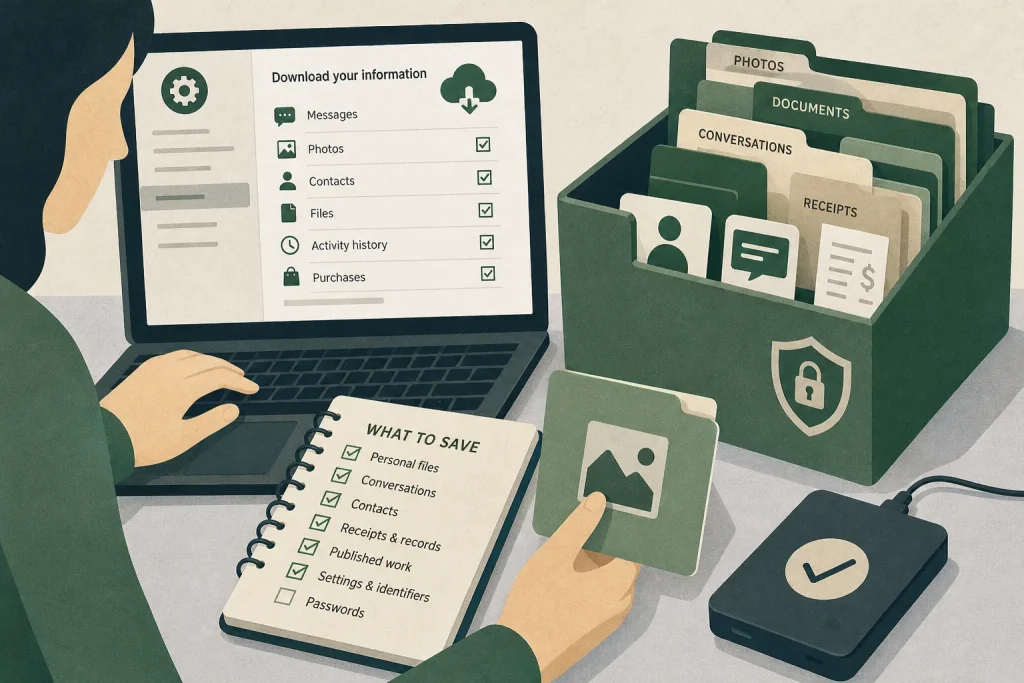
Can you close an account without losing something you still need? Before you confirm closure, find the service’s export tool, check what it includes and open the downloaded files while you can still access the account. An export is useful, but it may not contain everything the service holds or displays.
Make a short list of records with a clear future use. Download the relevant material, check that it opens and decide what to retain or delete. Treat this as a selective review, not a reason to keep every category the service offers.
Find the export tool in the account settings
Start in the account settings rather than the closure screen. Look for labels such as Your data, Privacy, Download your information, Export or Account data. The option may be in a privacy centre or help page rather than beside your profile settings.
Use the service’s official website or app, reached by typing its address or opening a bookmark. If an email or search result links to an export page, check the address before signing in. An archive can contain private messages, contacts or documents, so do not enter your password on a lookalike page.
Some services let you choose data categories, date ranges or file formats; others provide one broad download. Select only what you need when choices are available. If the options are unclear, read the service’s explanation before requesting an export.
Check these details before requesting a download
Use each item to make a decision about what to request and where to put it. A service may not offer every option.
- Available categories: Check whether messages, photos, posts, contacts, files, profile details, activity history or purchases are listed. If the needed category is available, select it; if not, look for an individual save option or decide whether you can proceed without it.
- Date or account filters: Check whether you can narrow the export to a relevant period or account area. If a suitable filter is available, use it; if not, expect a broader download and plan to remove material you do not need.
- File format: Check whether the archive contains familiar files such as images or PDFs, or structured data such as JSON, CSV or HTML. If you can use the offered format, proceed; if not, see whether another format or an individual download is available.
- Delivery method: Check whether the service provides a download link, saves files to cloud storage or sends a notification. If the destination belongs to you and you can access it, continue; if not, update the destination or choose another available method.
- Preparation and access conditions: Check whether the export takes time, requires another sign-in or has a temporary download link. If you can complete those actions before closure, request it now; if you cannot, delay closing the account.
- Included and excluded data: Check the service’s description for omissions, limits or records held by other users or connected services. If the stated contents meet your purpose, continue; if not, look for separate exports or save the particular items individually.
- Storage destination: Check that the device or folder is under your control and access is limited to appropriate people. If it is suitable, choose it before downloading; if it is shared or public, select a private destination instead.
If you cannot find an export option, consult the service’s official help centre. If a particular item cannot be exported, consider saving it individually from your account. A screenshot or browser printout may not preserve the original file, message details or context.
Understand what an export may leave out
An export is a copy of the information the service makes available through that tool. It may not include every screen, setting, temporary item or record connected with your account. Read the service’s description for its stated limits, but do not assume the archive mirrors the whole account.
A download might contain your side of a conversation but not material another person supplied. It might include a link to a file rather than the file itself. Services can also keep information in separate products, such as a social account and a photo app, while connected apps may require their own exports.
Check important items in the account before closure. Open files from each category you care about and compare them with what you can still see. If an archive has a folder of media and a separate file describing posts, confirm that the media files are present and that the descriptions identify them clearly enough to use.
An export may not preserve the service’s original layout, comments in context, working links or features that depend on the account. Identify what a record needs to do for you, then check whether the downloaded material is fit for that purpose.
Save records with a clear future use
Start with material that would be difficult to recreate or retrieve elsewhere. Check whether another person or service already has a usable copy, and consider the privacy of anyone else whose information appears in the files.
- Personal files: Check whether the archive contains photos, documents or creative work you own and want to retain. If the files open and have a use, keep them in a private folder; if they do not, try the service’s suggested format or decide they are not worth retaining.
- Conversations: Check whether particular messages or attachments are needed for a practical reason. If so, save only the relevant material and restrict access; if not, leave it out or delete it.
- Contacts and group details: Check whether you still need names or contact details and have a proper reason to retain them. If you do, keep only the necessary entries securely; if not, exclude or delete them.
- Receipts and account records: Check whether invoices or transaction confirmations serve a continuing purpose. If they do, retain them in an appropriately protected place; if you are unsure about legal, tax or financial retention duties, ask a qualified professional before deleting them.
- Published work: Check whether you want a personal copy of your writing or other material. If you do, save it while respecting others’ rights; if other people’s work is mixed in, separate what you may keep or omit the file.
- Settings and identifiers: Check whether a username, subscription status or service reference will be useful elsewhere. If it will, record only that detail; if it will not, leave it out. Do not keep passwords or other credentials in an ordinary export folder.
Say you are closing an old photo-sharing account. For this invented example, suppose you need family pictures and two event conversations, but not routine activity history. You select the photo and message categories, download the archive to a private folder and open several images and message files. The images display, and the conversations contain the attachments you wanted, so you copy those items into a clearly named folder. You then remove the activity-history files from the working copy and check that the saved pictures and messages remain accessible. The resulting collection contains the material you identified as useful, without keeping the unrelated history in that folder.
Open representative files before relying on the export
Do not rely only on the service’s completion notice. Find the downloaded archive and check that it is not obviously empty. If it is compressed, use a trusted tool already available on your device, such as its built-in archive utility. Avoid uploading a private export to an unfamiliar website for inspection or conversion.
Open a sample from each important category: perhaps a document, a message file and a media file. Check that filenames and folders make sense, images display and data files can be read with a suitable application. A JSON file is structured text; a browser, code editor or data-viewing tool may make it easier to inspect. If you do not need that format, look for a simpler copy.
If a file will not open, consult the service’s help page for recommended software or instructions. Then check whether another export format or individual save option is available. Keep the original archive unchanged until your chosen copies work. If you request a fresh export, use the official process and inspect the new files before removing the earlier download.
Store the archive without creating another privacy risk
An export gathers information that may previously have been spread across an account. Treat it as sensitive. Save it on a device you control or in trusted storage protected by a strong, unique password and multi-factor authentication where available. Avoid public or shared computers and folders other people can browse.
Choose a folder name that does not expose sensitive details on a shared screen. Keep full-disk encryption enabled if your device supports it. For especially sensitive material, use a reputable encryption tool and store recovery information separately; losing the password can make the archive inaccessible. Avoid sending an unprotected archive as an email attachment or leaving it in a general downloads folder indefinitely.
Make only the copies you need. For an external drive, check who can access it and store it securely. For cloud storage, review folder permissions and sharing links. Once you have confirmed the intended copy is safe, remove unnecessary copies from devices or cloud locations.
Keep only records you can justify retaining
Keep the full archive only if it has a clear purpose and you can protect it. An export may combine old profile details, contact information and activity records with the files you wanted. Keeping everything can create a concentrated privacy risk and make useful items harder to find.
After checking the download, separate useful files from the rest. Keep the original archive temporarily if you may need it while checking your selected copies. When you are satisfied, delete surplus files and empty the device’s rubbish or recently deleted folder if it has one. Check other locations where you deliberately stored copies, such as a backup drive or cloud folder, and remove unnecessary versions there too.
Retention depends on the purpose and the rules that apply to you. A family photo, work document and financial record may need different treatment. This article offers general account-closure guidance, not legal, tax or financial advice; requirements can vary by jurisdiction, record type and personal or organisational circumstances. If a record may be subject to a retention duty, or belongs to an employer or another person, check the relevant policy or ask a qualified legal, tax or financial professional before deleting it.
Close the account only after checking connected services
Before closure, review services that rely on the account. The login may also be used for another app, a subscription, a device backup or third-party sign-in. Visit the relevant settings and change those connections first if you want to keep using them.
Read the closure screen carefully. It may distinguish deactivation from permanent deletion, explain what happens to shared content or describe a period in which you can reverse the request. Follow the service’s instructions and keep any confirmation until closure is complete. Deleting the app from your phone does not, by itself, close the account.
Before confirming, check that the files you chose open, you know where they are stored, unwanted copies have been removed and connected sign-ins have been handled. If any answer is no, pause and address it. Then close the account through the service’s official settings, keeping only the export material that still has a clear purpose.