Private Browsing Does Not Hide You from Every Stop
A private window can limit what remains in your browser after a session, but it does not make your traffic invisible to websites, networks or service providers.
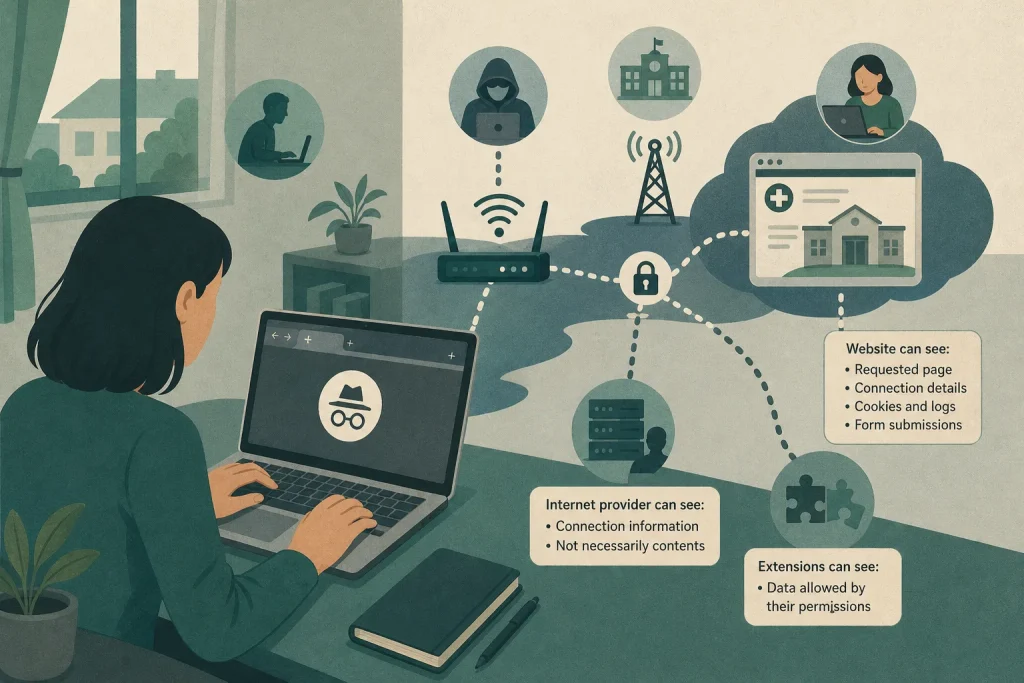
You open a private window on a shared laptop, look up a sensitive appointment and close the window. The next person may not see the page in the browser’s regular history, but the visit has not necessarily vanished everywhere. What private browsing hides depends on who is looking and where information was recorded.
Imagine Maya borrowing a family laptop to find a clinic near her new workplace. She wants to avoid leaving the search in the browser for another household member to stumble across. A private window can help with that specific concern, but it is not a cloak around her internet connection. Following her visit from the laptop to the clinic’s website shows where the boundaries lie.
The browser limits some local traces
Maya opens a private window, searches for the clinic and reads its appointment information. In many browsers, private browsing keeps visited pages out of the regular history and clears session cookies and site data when all private windows are closed. Cookies are small pieces of data websites use to remember a browser; clearing session data can prevent the next person from simply reopening the same signed-in session. The exact behaviour varies, so check the browser’s own explanation of private mode.
Private browsing does not necessarily remove files Maya deliberately downloads, bookmarks she saves or information she types into a form and submits. Those can remain in ordinary folders or on the website’s account. If she downloads a clinic leaflet, she should treat it as a normal file: check the Downloads folder and delete the file if she no longer wants it on the shared laptop. If the operating system has a bin or recycle bin, check there too.
The website can still receive a visit
When Maya’s browser requests the clinic’s page, the website receives the information needed to send that page back. The site can typically see the requested page and connection details, and may receive browser information such as its type and language. It can record information in its own logs or use cookies and other technologies during the session.
Private browsing separates some activity from the browser’s usual stored history and cookies. It does not stop the clinic’s site from recognising a logged-in account, recording a form submission or linking activity to information Maya provides. Signing in can associate a visit with her account; submitting a booking form is not undone by closing the window.
Maya reads the clinic’s public information without signing in or entering personal details, then closes every private window. That reduces what the next laptop user can casually find in the browser, but it does not erase the clinic’s records or make the visit anonymous to the site.
Network visibility depends on the network
Maya’s request travels through a network before reaching the clinic. A Wi-Fi operator may be able to observe some connection details, such as the service or domain contacted, depending on the network’s configuration and available tools. A workplace or school may manage its network and may monitor activity under its policies and applicable rules. The details differ between organisations, so check the relevant acceptable-use or privacy policy, or ask the network administrator if you need to know what is recorded.
HTTPS, usually shown by a padlock or a secure-connection indicator in the browser, encrypts information sent between the browser and website. This protects page contents from many people in transit, but it does not necessarily hide the destination or timing of a connection from every network observer. The website still receives the request, and a private window does not change the network’s role.
If Maya is using a work or school network, she should follow its policy and avoid using it for personal activity she wants to keep private. That is a cautious choice, not a claim that every organisation monitors every connection. On a shared home network, the practical question is who can access the router or any monitoring tools, and what those tools record.
Other services and extensions may have access
An internet service provider carries traffic between a household connection and online services. Depending on encryption, service configuration and applicable rules, it may be able to observe connection information, though not necessarily the contents of an encrypted page. Private browsing does not conceal a connection from the provider.
A search engine receives searches made through its service. Browser extensions may also have access to browsing information if they have been granted relevant permissions. Some browsers let you control whether each extension can run in private windows, so check the extensions page rather than assuming that private mode excludes them.
Maya checks her browser’s extension settings. Her password manager is permitted in private windows, while an unfamiliar shopping extension is not. She leaves the password manager enabled only if she needs it and keeps the other extension disabled. The point is to check each tool’s permissions and choose deliberately; private mode does not set an extension’s own access rules.
Match the privacy measure to the observer
Say Maya’s aim is to keep a search out of the shared laptop’s regular history. She uses a private window, avoids signing in, closes all private windows and checks the Downloads folder for anything she saved. The expected result is less routine browser data left for the next user to see, while the website and network may still retain or observe connection information.
If another household member might access the laptop while Maya is browsing, she locks the screen before stepping away. If she is on a managed work or school network, she checks the relevant policy and follows it rather than treating a private window as a way around network rules. If she has submitted personal details to a website, she uses that service’s privacy or account controls to ask about its records; clearing local browser data will not remove them.
Before using private browsing, name the observer you want to keep information from: the next person using the device, the website, the network operator or an extension. Then check what that observer can access and choose a measure that addresses it. A private window is useful for limiting some traces on the device, but it is not a general invisibility switch.